How It Works
This page explains what django-sysconfig does under the hood — from the moment Django starts up to the moment your code reads a config value. You don't need this to use the library, but it's helpful when you're debugging, extending, or just curious.
The lifecycle at a glance
Django startup
    └─ AppConfig.ready()
        └─ autodiscover_modules("sysconfig")
            └─ imports sysconfig.py from every installed app
                └─ @register_config(...) runs
                    └─ ConfigRegistry stores the schema
                    └─ DB rows created for fields with defaults (get_or_create)

config.get("myapp.general.site_name")
    └─ Parse path → app="myapp", section="general", field="site_name"
    └─ Check cache → HIT: return deserialized value
                  → MISS: query DB → deserialize → write to cache → return

config.set("myapp.general.site_name", "Acme")
    └─ Validate value against field's validators
    └─ Serialize value using field's FrontendModel
    └─ Write to DB (INSERT or UPDATE)
    └─ Invalidate cache entry
    └─ Call on_save callback (if defined)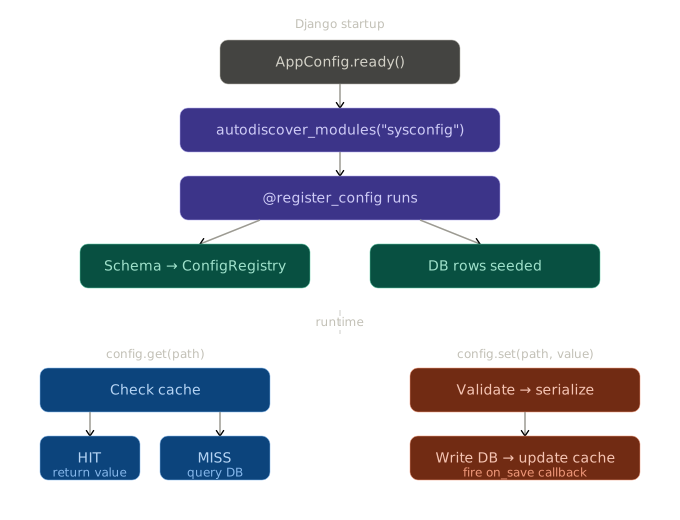
1. Autodiscovery
django-sysconfig uses Django's built-in autodiscover_modules utility (the same mechanism Django admin uses to find admin.py files). When AppConfig.ready() fires, it calls:
from django.utils.module_loading import autodiscover_modules
autodiscover_modules("sysconfig")
This imports sysconfig.py from every app in INSTALLED_APPS. The import side-effect is what matters: the @register_config(...) decorator runs, registering each config class with the global ConfigRegistry.
Nothing is wired up manually. You don't call include() or register() anywhere. Dropping a sysconfig.py file in an installed app is enough.
2. The ConfigRegistry
The ConfigRegistry is a global singleton that holds the entire configuration schema in memory. It's a dictionary keyed by app label, where each value contains the sections and fields discovered during startup.
When you call config.get("myapp.general.site_name"), the accessor validates the path against the registry first — making sure the app, section, and field all exist — before touching the database or cache.
The registry is read-only at runtime. Nothing modifies it after startup.
3. Database storage
django-sysconfig uses a single model, ConfigValue, with three meaningful columns:
| Column | Type | Description |
|---|---|---|
path | string | The full dot-notation path: myapp.general.site_name |
value | text | The serialized value (always a string in the DB) |
app_label | string | Denormalized app label, used to filter by app |
Every value — integer, boolean, decimal, encrypted secret — is stored as a string. Serialization and deserialization are handled by the field's FrontendModel.
On startup, for every field that has a default value, django-sysconfig calls ConfigValue.objects.get_or_create(path=..., defaults={"raw_value": ...}). This means:
- First run: all fields with defaults get database rows.
- Subsequent runs: existing rows are left untouched. Your saved values are never overwritten.
- New fields added to code: they get rows on the next startup.
- Fields removed from code: their rows remain in the database (orphaned but harmless).
4. Serialization
Each FrontendModel class is responsible for two operations:
serialize(value)— converts a Python value to a string for storagedeserialize(raw)— converts a stored string back to the correct Python type
For example, IntegerFrontendModel serializes 100 as "100" and deserializes "100" back to 100. BooleanFrontendModel uses "1" and "0". DecimalFrontendModel uses Python's str(Decimal(...)) representation.
SecretFrontendModel adds an encryption step on top of serialization. See Encryption for details.
5. Caching
Every config.get(...) call goes through the cache layer before hitting the database. The cache key for each value is derived from its path.
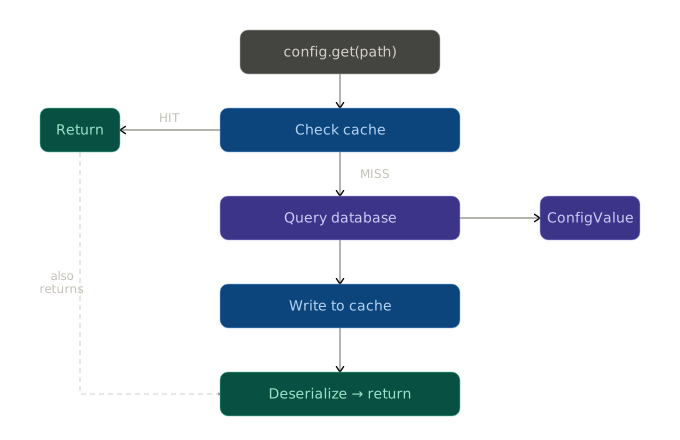
- On read: check the cache. If the value is there, deserialize and return it. If not, query the database, write the result to the cache, and return it.
- On write: after saving to the database, the cache entry for that path is deleted (invalidated). The next read will populate it from the database.
- Cache entries have no expiry. They are only invalidated explicitly, on write. This means your configuration reads are very fast in steady state.
The cache uses whatever backend you've configured in CACHES. If you're running multiple processes (e.g., Gunicorn workers), make sure you're using a shared cache backend like Redis or Memcached — not the default LocMemCache, which is per-process. More info here.
6. The accessor
The config object you import from django_sysconfig.accessor is an instance of ConfigAccessor. It's stateless — all state lives in the registry, the database, and the cache.
The accessor:
- Parses and validates the dot-notation path
- Looks up the field definition in the registry (to know which
FrontendModelto use) - Reads from / writes to the cache and database
- Handles deserialization
- Fires
on_savecallbacks after writes
See the Accessor API reference for every available method.
7. The admin UI
The admin UI is two class-based views:
ConfigAppListViewat/admin/config/— lists all registered app labelsConfigAppDetailViewat/admin/config/<app_label>/— renders all sections and fields for an app, handles form submission
Both views require request.user.is_staff. The detail view reads field definitions from the registry to build the form, and calls config.set(...) (not direct DB writes) when a form is submitted — so validation, caching, and on_save callbacks all fire normally.
The admin index page is patched with a small banner that links to /admin/config/, so staff members can discover the config UI without needing to know the URL.
Summary
| Layer | What it does |
|---|---|
sysconfig.py | Defines the schema (fields, types, defaults, validators) |
ConfigRegistry | Holds the schema in memory after startup |
ConfigValue | Stores values in the database as serialized strings |
FrontendModel | Handles serialization, deserialization, and UI rendering |
| Cache layer | Wraps Django's cache framework, invalidated on every write |
ConfigAccessor | The public API your application code uses to read/write values |
| Admin views | Staff UI for editing values, built on top of the accessor |